AI Assistant
Bibliogon includes an optional AI assistant that helps with writing, editing, and marketing. It supports multiple AI providers and works with both cloud services and local models.
Setting up
- Open Settings > General > AI Assistant
- Check Enable AI features
- Select your provider (Anthropic, OpenAI, Google Gemini, Mistral, or LM Studio)
- Enter your API key (not needed for LM Studio)
- Click Test connection to verify
On first launch, a setup wizard guides you through these steps.
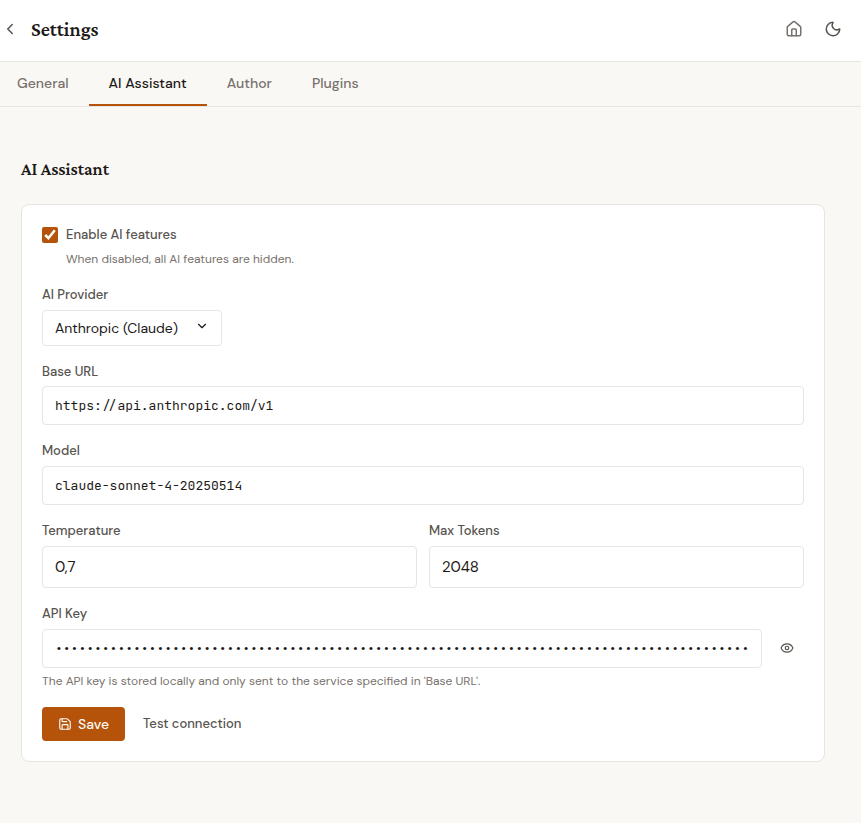
The AI assistant is disabled by default. Your text is only sent to the AI provider when you explicitly use an AI feature. Nothing is sent in the background.
Providers
| Provider | Requires API key | Notes |
|---|---|---|
| Anthropic (Claude) | Yes | High-quality writing assistance |
| OpenAI (GPT) | Yes | Widely available |
| Google (Gemini) | Yes | Free tier available |
| Mistral | Yes | European provider |
| LM Studio | No | Runs locally on your computer, fully offline |
LM Studio is ideal if you want AI assistance without sending your text to a cloud service.
Text suggestions
In the editor, select some text, then click the AI button in the toolbar. Four modes are available:
- Improve - fix grammar, improve clarity and flow
- Shorten - make the text more concise
- Expand - add more detail and description
- Custom - enter your own instruction
The AI returns a suggestion. Click Accept to replace your selection, or Discard to keep the original.
The AI adapts its suggestions to your book's genre and language.
Chapter review
Click the Review tab in the AI panel. The AI analyzes your entire chapter and returns a structured Markdown report you can save and re-open.
Focus modes
Pick exactly one focus before clicking Review chapter:
- Style - writing style: word choice, sentence variety, readability, voice consistency. Use this when the story works but the prose needs polish.
- Consistency - internal contradictions within the chapter: facts, timing, character traits, locations, object descriptions. Use this to catch the small "her coat was blue two pages ago, now green" kind of mistakes before a reader spots them.
- Beta Reader - open-ended first-read feedback: what engages, what drags, what confuses, questions left in the reader's mind. Use this when the chapter is done and you want a "fresh eyes" pass.
The three legacy focus values (Coherence, Pacing, Dialogue, Tension) are still supported on the API level for power users but are no longer exposed in the UI.
Cost estimate
The Start button shows a rough input-token count and USD cost estimate based on your chapter length and the configured model (e.g. ~5k tokens, ~$0.075). The estimate is conservative; actual usage is usually lower. No estimate is shown when the model is unknown to Bibliogon's price table.
Non-prose chapters
For chapter types that are not narrative prose (title page, copyright, table of contents, imprint, index, half title, also-by-author, next-in-series, call-to-action, endnotes, bibliography, glossary), Bibliogon shows a small warning above the Start button. You can still run a review; the feedback may be more limited than for prose.
Structured output
Every review uses the same structure:
- Summary - one sentence about the chapter's content
- Strengths - what works well, with specific references
- Suggestions - concrete improvements with explanations
- Overall - a brief assessment
The review considers your book's genre, language (all 8 supported UI languages), and the selected chapter type, so feedback is appropriate to the section (e.g. pacing feedback for thrillers, minimal tone notes on a dedication, compliance hints on copyright pages).
Persistence + download
Every review is saved as a Markdown file under uploads/{book_id}/reviews/ with a filename like {review-id}-{chapter-slug}-{YYYY-MM-DD}.md. A Download report button appears next to the result so you can save the file locally for a writing notebook, attach it to a commit, or keep a history per chapter. When a chapter is deleted, its review files are automatically cleaned up alongside the chapter content.
Async progress
Large chapters can take 5-60 seconds. The review runs as a background job; the editor stays usable, and a rotating status message (in your book's language) is shown while the analysis runs. You can close the AI panel mid-review; when the review finishes, the result re-appears on reopen.
Marketing text
In Book Metadata > Marketing, each text field has a small AI button:
- Book description (Amazon) - generates an HTML blurb for online stores
- Back cover text - concise text for the printed back cover
- Author bio - short biography in third person
- Keywords - search terms for Amazon KDP
The AI uses your book title, author name, genre, description, and chapter titles to generate relevant text. You can edit the result before saving.
Usage tracking
Bibliogon tracks how many AI tokens each book uses. The current count and estimated cost range are shown in the Marketing tab. This helps you understand your AI usage and costs.
Privacy
- AI features are off by default
- Your text is only sent when you click an AI button
- Nothing is sent in the background
- The API key is stored locally, never shared
- LM Studio keeps everything on your computer