Settings navigation
The Settings page is split into a left sidebar where every tab is grouped by topic. The sidebar stays visible on the left; the active tab's content renders on the right. Anchor URLs (?tab=...) keep working — bookmarks and help-doc links land on the right tab without any change.
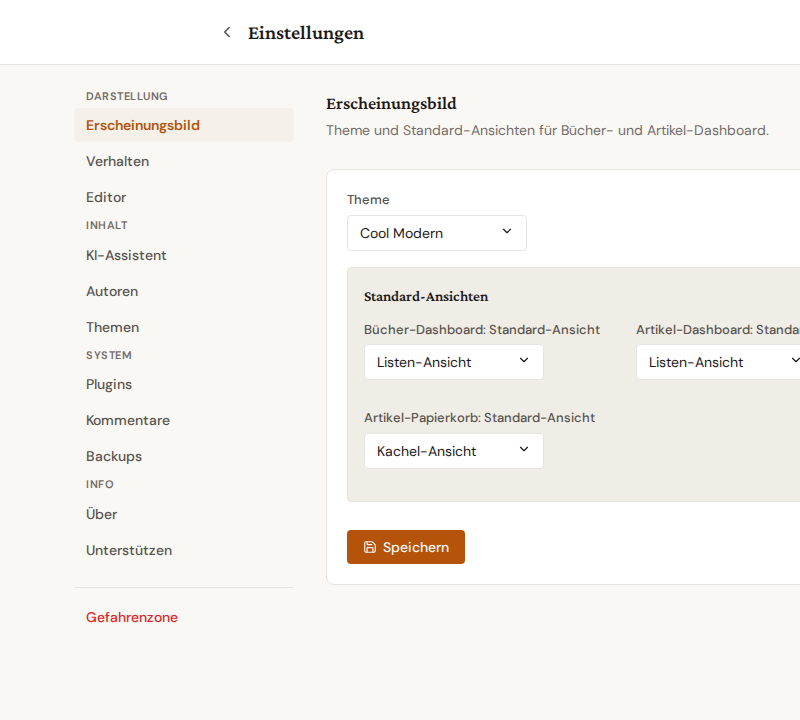
Groups
- Display — Appearance, Behavior, Editor.
- Content — AI Assistant, Authors, Topics.
- System — Plugins, Comments, Backups, Advanced.
- Info — About, plus Support (when donations are configured).
- Danger Zone — visually separated at the bottom with a red accent; see Danger Zone.
Mobile view
Below 768 px width the sidebar collapses and a hamburger dropdown opens the tab list instead. The grouping is preserved: separators between groups are kept inside the popover.
Tips
- The active tab's URL stays in the address bar, so reload + back button return to the same tab.
- Legacy bookmarks like
?tab=authoror?tab=authors_databaseare auto-redirected to the consolidated?tab=autoren.
Related
- Danger Zone — the red area at the bottom of the sidebar with the full-system reset
- Editor display settings — per-browser editor rendering
- Dashboard pagination — per-account page-size control